Marketing teams now face a choice that changes how company websites are built. You can use a structured visual platform like Webflow, or any other good no-code platform, to run your public presence. Or you can type plain text prompts into an AI engine like Claude Code, Antigravity, Lovable or Bolt to build a custom codebase, deploying it to serverless hosting with an independent headless content management system.
Most reviews look at this through the eyes of software engineers. They discuss code patterns, clean files and script preferences. This guide ignores those arguments. My customers and prospects aren't developers, so I'm looking at this from the perspective of a business owner who cares about speed, financial stability, and a team's operational independence.
The choice, as I see it, comes down to where you want your overhead to sit.
1. Lifecycle friction: where is developer time concentrated?
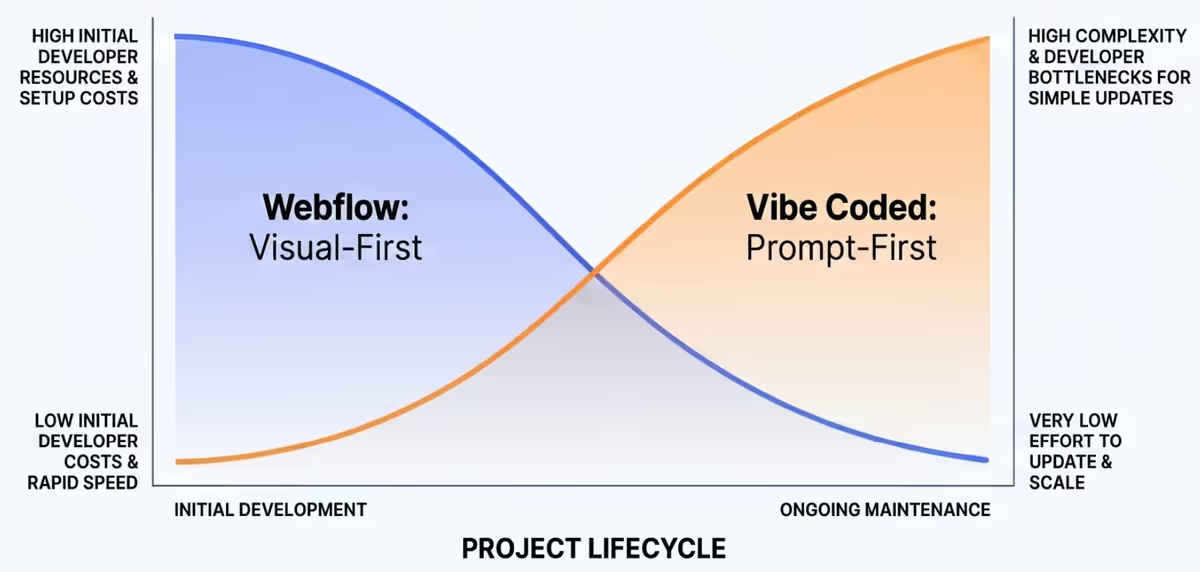
Every website moves through three distinct phases: design, build, and daily operations. The setup you choose determines when and where you must pay for technical help.
The design phase
Webflow uses a visual panel that maps interface actions directly to clear CSS styles. If your designer understands positions, grids and margins, they can build precise layouts directly inside the browser.
When you build through text prompts, design becomes a translation loop. You tell the AI to adjust a button or rearrange a section. Without a really clear direction, such as a well thought out design document, AI models lean on existing web trends and often output generic layouts, though even this is improving rapidly.
It's easy for your company to end up looking identical to your competitors. Fixing micro-UI elements like spacing or padding through a text chat is inefficient and burns tokens, which is to say money. Owners end up spending real cash on API usage just to adjust simple margins. That said, the act of design is much faster when AI has its foot on the throttle. Much faster, but maybe not better. Yet.
The build phase
This is where text-driven generation wins the early race. A solo builder can prompt an engine to assemble index pages, forms and basic layouts in minutes. Webflow requires more manual construction, though the platform now supports generating interactive components with AI assistance inside the visual canvas. And being honest, even the prompting of a build is still best suited to a developer who knows how to instruct for good results.
The operations phase
This is where the scales tip. Webflow operates as a closed, managed platform. The company handles system updates, server maintenance and core security behind the scenes.
Vibe-coded repositories need ongoing manual attention. As you prompt the AI to add marketing features over several months, the context degrades. The AI wrote the code, but nobody on your team actually reads it. When a form breaks, you cannot fix it without an engineer to parse the code by hand.
2. Content changes: how many, and by who?
A marketing site is only useful if it updates quickly. When you need to ship a campaign page, modify pricing or post a case study, speed shapes your conversion.
Webflow leaves the day-to-day editing tools with your marketing team. Non-technical writers can open the browser editor, update copy, change images and push changes live with one click. No engineering tickets, no developer queues. Some of my clients do this themselves; some still pass the tasks to me because they lack dedicated marketing resource, and with seven years of Webflow experience I can make the changes quickly. Overall though, Webflow is a marketing-focused platform: developers and marketers build together, and marketers run the site day to day after launch.
If your site lives inside a custom repository generated by an AI, that marketing independence disappears. A marketer cannot simply click a paragraph to fix a typo. They must open a prompt window, describe the change, hope the engine executes it safely, and run a deployment. The person who runs the prompt is your new bottleneck. You trade a traditional engineering queue for an AI-whisperer queue.
                    webflow                     vibe-coded stack
primary workflow    visual drag-and-drop        conversational prompting
maintenance owner   non-technical marketers     prompt holder or engineer
cost model          predictable subscription    low hosting + token drain
code structure      structured design system    organic, compounding debt
best suited to      content-rich marketing      custom logic and micro-saas
3. Discoverability in the agentic era
Modern web search is no longer a simple matter of indexing static pages. Business buyers increasingly use conversational tools like ChatGPT, Claude and Perplexity to research vendor recommendations. The technical rules of discoverability have moved.
Most text-prompt tools default to client-side rendering. They build sites as single-page applications that serve content through client-side JavaScript. When a human opens the link in Chrome, the browser runs the script and displays the interface.
Search bots and AI retrievers do not operate like human browsers. Crawlers from OpenAI, Anthropic and Perplexity fetch raw HTML files. They do not execute client-side scripts, because parsing JavaScript at global scale is too slow and expensive. If your site serves an empty script shell, the AI crawler sees a blank div and leaves. Your content never enters their response pool.
Vibe-coded builds can avoid this blind spot if you provide specific instructions. A structured prompt can guide the engine towards semantic HTML, valid metadata and proper schema markup, and stacks like Next.js or Astro can output clean, pre-rendered pages. But your team must know to ask for it. If you do not explicitly prompt for static rendering, many engines build an invisible script shell by default. I reckon most content-heavy sites will struggle unless the files are fully readable by bots.
Webflow handles this by shipping flat, server-rendered files that crawlers can read instantly. The platform has also started to include tools that track how often your brand is mentioned inside ChatGPT answers for enterprise users, with content recommendations to keep your text readable for AI bots. I expect this to reach all users.
4. AI progress, and the security profile
AI development models are moving at extreme speed, and non-developers can now stand up full applications from plain text instructions. That capability will only grow.
But high intelligence does not guarantee clean security. AI engines train on public web repositories, meaning they mimic human errors, outdated logic and flawed patterns. Veracode's 2025 GenAI code security report found that around 45% of AI-generated code introduced security vulnerabilities, including injection points and broken verification routes.
When an AI writes a custom stack for your business, you inherit that security debt. If your marketing site collects user emails, contact names or corporate files, an unverified script can expose your data. A managed platform removes much of this exposure by sealing your site inside a closed environment.
5. Financial realities: twelve months of ownership
Site owners often choose prompt tools because the initial invoice reads zero. Map the ledger across a year and it looks different.
The Webflow balance sheet
Webflow charges a predictable monthly fee with structural limits: a content-driven marketing site runs on a plan in the tens of dollars a month, with caps on database items, pages and bandwidth, and per-seat charges for full workspace access. The current numbers are on Webflow's pricing page. The thing to watch is the success tax: a traffic spike from a good campaign pushes you past the bandwidth allocation, and the overage charges arrive automatically.
The prompt-stack balance sheet
A generated site deployed to serverless hosting has low ongoing infrastructure fees, and a headless CMS free tier costs nothing at normal traffic. Your AI subscription might be the only real line item.
The hidden item is the token spiral and rescue labour. When the system hits the fix-and-break wall a few months in, your team spends hours fighting the prompt logs. If the code gets messy enough, you hire an engineer to clean it up, and fixing an unguided AI mess typically drains whatever you saved on platform fees.
6. Stacking your platforms: the blended approach
You do not have to pick a single philosophy. Smart site owners combine both systems and give each the job it is good at.
The subdomain split
The most common configuration keeps your primary brand engine on a managed platform. Your core marketing site, resource content and search articles live on the main domain, load fast, rank cleanly, and stay directly editable by your marketing team.
Meanwhile, you use a prompt engine to build your actual application: customer portals, dashboards, internal tools. That custom code deploys to a subdomain, linked to its own data storage. Marketing autonomy on the main domain, custom capability next door.
AI inside the visual box
You can also use AI speed without leaving the managed system. Model Context Protocol lets developer tools talk directly to external platforms, and by linking a tool like Claude Code to Webflow's official protocol server, the AI can alter visual elements, upload database collections and adjust layouts from terminal instructions. The output remains standard, server-rendered Webflow code. Your marketing team keeps visual control, the site stays readable for AI search bots, and you avoid the maintenance traps of an unmanaged codebase.
Where to invest developer resources
Your allocation should follow your web needs:
- Volume of day-to-day changes. If your site relies on frequent marketing updates and rapid content iteration, a managed platform offloads the daily maintenance and keeps non-technical teams autonomous.
- Design approach. Complex custom-coded interactive elements will always need developer time for maintenance and security. A visual platform lets you borrow AI speed without the technical debt of unmanaged code.
- The strategic split. Manage the marketing presence on a platform that gives the team autonomy, and spend developer capacity on the custom tools that earn it, on their own subdomain.